






























































Editing a flow
You can use Copilot to insert actions and troubleshoot your flow.
- With the Copilot pane open, use a prompt to tell Copilot to add an action to perform OCR on the file before saving it to SharePoint.
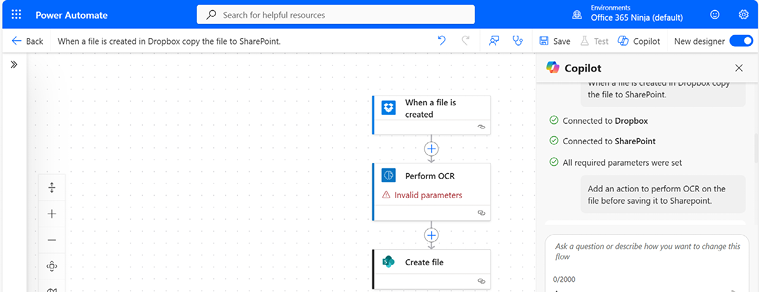
Figure 23.7 – Adding an OCR action through Copilot
- Click the Perform OCR action to expand the action’s flyout. Notice that there is no image file provided. Add a prompt to update the Image parameter. In this example, you can use the following prompt:
Use the file from Dropbox as the Image file for the Perform OCR action.
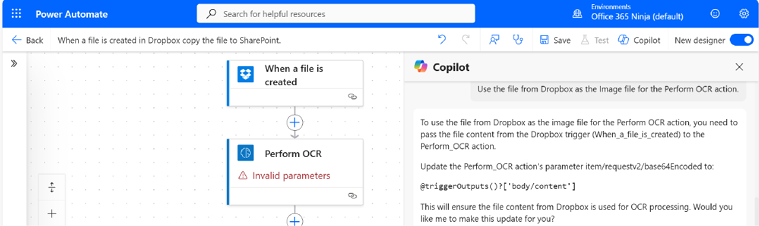
Figure 23.8 – Updating the Copilot prompt
- Simply respond
yesin the prompt field. - If Copilot is unable to perform the change on your behalf, you’ll still be able to take its instructions and modify the flow accordingly, as shown in Figure 23.9.
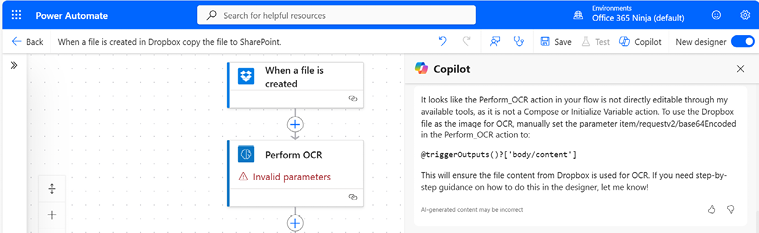
Figure 23.9 – Reviewing the Copilot prompt output
- Select the
@triggerOutputs()?[&apos...














