






























































Time for action – create a dictionary of pony names and keys
Create a Dictionary using type int for the keys.
Modify
LearningScriptas shown in the next screenshot.Save the file.
In Unity, click on Play.

What just happened?
Here is the output to Unity's Console.
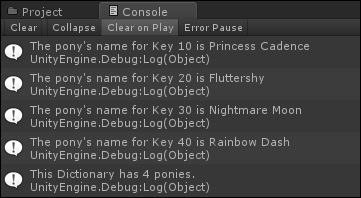
The analysis of code is as follows:
The code on line 8 is as follows:
Dictionary<int, string> myFavoritePonies = new Dictionary<int, string>();
Declaring a
Dictionaryis very similar to declaring aList.A
Dictionaryrequires you to specify the type for theKey.This example used integers for the keys.
The code on lines 10 and 11 is as follows:
myFavoritePonies.Add(10, "Princess Cadence");
myFavoritePonies.Add(20, "Fluttershy");
Here you added two ponies using
Add, just like you did for aList.The code on lines 12 and 18 with its description is as follows:
myFavoritePonies[30] = "Nightmare Moon";
myFavoritePonies[40] = "Rainbow Dash";
Here you added ponies by assigning the pony name to a particular dictionary key.






