





















































Search icon CANCEL
Subscription
0
Cart icon
Your Cart (0 item)
Close icon
You have no products in your basket yet
Save more on your purchases! discount-offer-chevron-icon
Savings automatically calculated. No voucher code required.
Arrow left icon
Explore Products
Best Sellers
New Releases
Books
Videos
Audiobooks
Learning Hub
Newsletter Hub
Free Learning
Arrow right icon
timer SALE ENDS IN
0 Days
:
00 Hours
:
00 Minutes
:
00 Seconds
Arrow up icon
GO TO TOP
Workflow Automation with Microsoft Power Automate

You're reading from   Workflow Automation with Microsoft Power Automate Design and scale AI-powered cloud and desktop workflows using low-code automation

Arrow left icon
Product type Paperback
Published in Dec 2025
Publisher Packt
ISBN-13 9781836649632
Length 544 pages
Edition 3rd Edition
Arrow right icon
Author (1):
Arrow left icon
Aaron Guilmette Aaron Guilmette
Author Profile Icon Aaron Guilmette
Aaron Guilmette
Arrow right icon
View More author details
Toc

Table of Contents (35) Chapters Close

Preface 1. Part 1: The Basics
2. Introducing Microsoft Power Automate FREE CHAPTER 3. Getting Started with Power Automate 4. Working with Email 5. Copying Files 6. Creating Button Flows 7. Generating Push Notifications 8. Working with Shared Flows 9. Part 2: Advanced Operations and Flows
10. Working with Conditions 11. Understanding Expressions and Functions 12. Getting Started with Approvals 13. Working with Multiple Approvals 14. Posting Approvals to Teams 15. Using Databases 16. Working with Microsoft Forms 17. Posting to Slack 18. Accepting User Input 19. Automating Entra ID 20. Part 3: Robotic Process Automation, AI Models, Copilot, and Beyond
21. Introducing Robotic Process Automation 22. Contributing to an Access Database with RPA 23. Automating Web Pages with RPA 24. Introducing AI Models and Generative AI 25. Creating a Sentiment Analysis Flow 26. Using Copilot to Create and Manage Flows 27. Using Generative AI to Summarize Documents 28. Part 4: Administration
29. Exporting, Importing, and Distributing Flows 30. Monitoring and Troubleshooting Flows 31. Governance in the Power Platform 32. Unlock Your Exclusive Benefits 33. Other Books You May Enjoy
34. Index

Sharing a flow with run-only permissions

The run-only permissions feature allows you to grant a very limited set of permissions to manually triggered flows (such as button and instant flows).

Note

Run-only permissions are not available for automated flows.

With this option, users can only execute the flow. They cannot edit or modify any part of the flow and will only be granted permission to trigger it.

To grant run-only permissions to a button or instant flow, follow these steps:

  1. Log in to the Power Automate web portal (https://make.powerautomate.com) and select My flows.
  2. Select the ellipsis for a button or instant flow, such as the button or instant flow you created in Chapter 5, Creating Button Flows. Select Details to open the Details page:
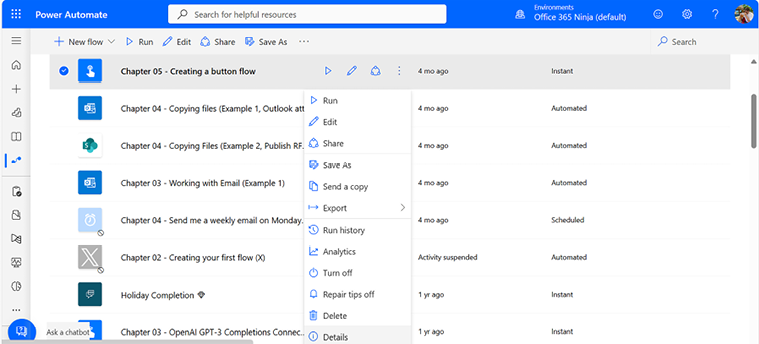
Figure 7.21 – Opening the Details page

Figure 7.21 – Opening the Details page

  1. In the Run-only user section, click Edit:
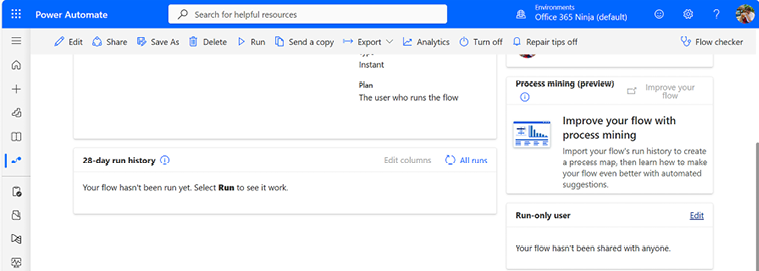
Figure 7.22 – Viewing the flow Details page

Figure 7.22 – Viewing the flow Details page

  1. In the...
lock icon The rest of the chapter is locked
Visually different images
CONTINUE READING
83
Tech Concepts
36
Programming languages
73
Tech Tools
Icon Unlimited access to the largest independent learning library in tech of over 8,000 expert-authored tech books and videos.
Icon Innovative learning tools, including AI book assistants, code context explainers, and text-to-speech.
Icon 50+ new titles added per month and exclusive early access to books as they are being written.
Workflow Automation with Microsoft Power Automate
Register for a free Packt account to unlock a world of extra content!
A free Packt account unlocks extra newsletters, articles, discounted offers, and much more. Start advancing your knowledge today.
Unlock this book and the full library FREE for 7 days
Get unlimited access to 7000+ expert-authored eBooks and videos courses covering every tech area you can think of
Renews at €18.99/month. Cancel anytime
Modal Close icon
Modal Close icon










