






























































Viewing a run history
The run history will display a log of all the times that a flow has executed over the previous 28 days. To view the run history, follow these steps:
- Using one browser session, log in to Office 365 (https://portal.office.com) as a user without a manager value assigned. If you are using a trial tenant to complete this process, you can simply create a new user account and choose not to assign it a manager.
- Navigate to the procurement approval site and submit a request. If you haven’t created this workflow, review Chapter 11, Working with Multiple Approvals, and create a similar workflow.
- Using a second browser session, navigate to the Power Automate maker web portal (https://make.powerautomate.com) and click My flows.
- Select the Purchase Order Request Two-Stage Approval workflow. The run history will be displayed toward the bottom of the page:
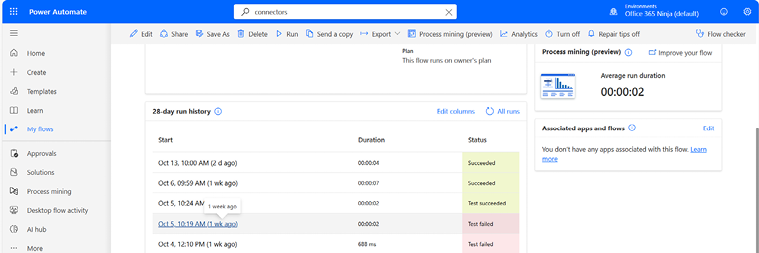
Figure 26.1 – Reviewing the run history for a flow
- Under...












