

Content Library of Dynamics 365 Learning Path
The Learning Path Content Library is used to show the contents created and available for an organization. Additionally, it is used to manage, create, and interact with controls. The Content Library is accessible from the Training tab of the Dynamics 365 site map, or click on the Content Library option on the side bar.
The following image will explain the Content Library UI:
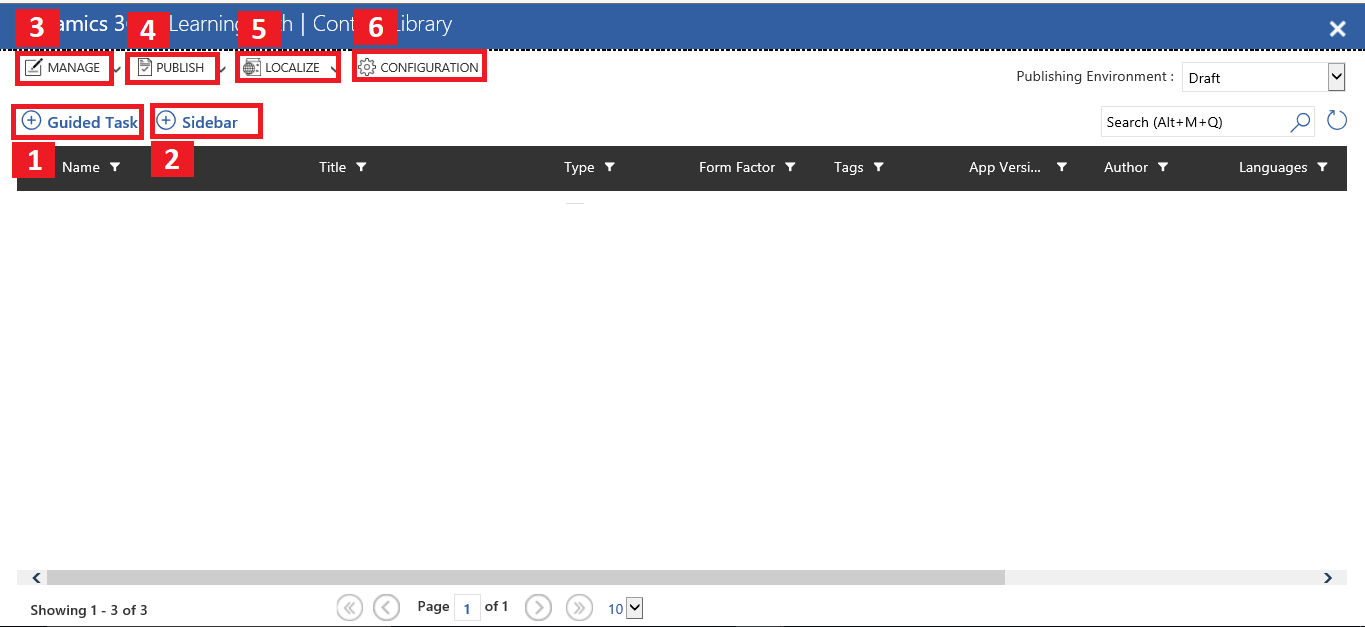
Consider the following points:
Guided Task:
Guided Task contains a single or sequence of steps. Launching Guided Task is simple. It guides the user through a step-by-step process and helps the user to understand the new task. It ensures you add data as well as perform tasks simultaneously. It provides a next button to the user, which makes it efficient to use if the user is performing any task.
It supports many things such as adding videos, links, and more information to help the user be more familiar with the Dynamics 365 UI.
Sidebar:
Sidebars appear when the user clicks on the...